- Integrate Database Mail.
- Database mail
- Database Mail Configuration Wizard
- sysmail_configure_sp
- How to: Convert Stored Procedures from SQL Mail to Database Mail (Transact-SQL)
- Database Mail Architecture
- Planning for Database Mail
- Database Mail XPs Option
- Database Mail Configuration Stored Procedures
- Database Mail Configuration Objects
- Mail Host Database
- Database Mail Views (Transact-SQL)
- Database Mail and SQL Mail Stored Procedures (Transact-SQL)
- Database Mail Profiles
- Database Mail Accounts
- How to: Create Database Mail Accounts (Transact-SQL)
- How to: Create Database Mail Private Profiles (Transact-SQL)
- How to: Create Database Mail Public Profiles (Transact-SQL)
- Implement full-text search
- Full-text search
- Full-Text Search Overview
- Full-Text Search Architecture
- Administering Full-Text Search
- Querying SQL Server Using Full-Text Search
- Troubleshooting Full-Text Search
- Full-Text Predicates and Functions Overview
- Supported Forms of Query Terms (Full-Text Search)
- Limiting Ranked Result Sets (Full-Text Search)
- Querying varbinary(max) and xml Columns (Full-Text Search)
- Querying Multiple Columns (Full-Text Search)
- Querying Linked Servers (Full-Text Search)
- Performance Tuning and Optimization of Full-Text Queries
- How Search Query Results Are Ranked (Full-Text Search)
- CONTAINS (Transact-SQL)
- CONTAINSTABLE (Transact-SQL)
- FREETEXT (Transact-SQL)
- FREETEXTTABLE (Transact-SQL)
- Stopwords and Stoplists
- CREATE FULLTEXT STOPLIST (Transact-SQL)
- How to: Create a Full-Text Stoplist (SQL Server Management Studio)
- ALTER FULLTEXT STOPLIST (Transact-SQL)
- How to: Change the Properties of a Full-Text Stoplist (SQL Server Management Studio)
- DROP FULLTEXT STOPLIST (Transact-SQL)
- CREATE FULLTEXT INDEX (Transact-SQL)
- How to: Start the Full-Text Indexing Wizard (SQL Server Management Studio)
- ALTER FULLTEXT INDEX (Transact-SQL)
- How to: View or Change the Properties of a Full-Text Index (SQL Server Management Studio)
- transform noise words Option
- sys.fulltext_stoplists (Transact-SQL)
- sys.fulltext_stopwords (Transact-SQL)
- sys.dm_fts_parser (Transact-SQL)
- Configuring Full-Text Linguistic Components
- Implement scripts by using Windows PowerShell and SQL Server Management Objects (SMOs)
- SQL Server PowerShell overview
- SQL Server PowerShell Help
- Running SQL Server PowerShell
- Using the SQL Server PowerShell Provider
- Using the SQL Server cmdlets
- Using SQL Server Identifiers in PowerShell
- Query Expressions and Unique Resource Names
- How to: Enable or Disable a Server Network Protocol (SQL Server PowerShell)
- Scripting (Database Engine)
- Using the Invoke-Sqlcmd cmdlet
- Using the Invoke-PolicyEvaluation cmdlet
- Microsoft.SqlServer.Management.Smo
- Microsoft.SqlServer.Management.Smo.Agent
- Microsoft.SqlServer.Management.Smo.Broker
- Microsoft.SqlServer.Management.Smo.Mail
- Microsoft.SqlServer.Management.Smo.Wmi
- Implement Service Broker solutions
- Service Broker Tutorials
- Benefits of Programming with Service Broker
- Service Broker Applications
- Planning for Service Broker Development
- Developer Responsibilities for Service Broker
- Service Broker Programming Concepts
- Creating Service Broker Objects
- Creating Service Broker Applications
- Transactional Messaging
- Controlling Transactions (Database Engine)
- BEGIN DIALOG CONVERSATION (Transact-SQL)
- BEGIN CONVERSATION TIMER (Transact-SQL)
- GET CONVERSATION GROUP (Transact-SQL)
- END CONVERSATION (Transact-SQL)
- MOVE CONVERSATION (Transact-SQL)
- RECEIVE (Transact-SQL)
- SEND (Transact-SQL)
- Broker System Messages
- Conversation Group Locks
- State Management
- Service Broker Application Outline
- CREATE QUEUE (Transact-SQL)
- Service Broker Activation
- Error Handling for Service Broker
- Contracts
- CREATE CONTRACT (Transact-SQL)
- DROP CONTRACT (Transact-SQL)
- Creating Service Broker Contracts
- Dialog Conversations
- BEGIN DIALOG CONVERSATION (Transact-SQL)
- BEGIN CONVERSATION TIMER (Transact-SQL)
- END CONVERSATION (Transact-SQL)
- SEND (Transact-SQL)
- RECEIVE (Transact-SQL)
- sys.transmission_queue (Transact-SQL)
- Conversation Groups
- sys.conversation_endpoints (Transact-SQL)
- sys.conversation_groups (Transact-SQL)
- Message Types
- Messages
- Queues
- CREATE QUEUE (Transact-SQL)
- ALTER QUEUE (Transact-SQL)
- DROP QUEUE (Transact-SQL)
- Services
- CREATE SERVICE (Transact-SQL)
- ALTER SERVICE (Transact-SQL)
- DROP SERVICE (Transact-SQL)
- Building Applications with Service Broker
- Remote Service Bindings
- CREATE CERTIFICATE (Transact-SQL)
- CREATE LOGIN (Transact-SQL)
- CREATE USER (Transact-SQL)
- Security and Protection (Service Broker)
- CREATE REMOTE SERVICE BINDING (Transact-SQL)
- ALTER REMOTE SERVICE BINDING (Transact-SQL)
- DROP REMOTE SERVICE BINDING (Transact-SQL)
- Routes
- Service Broker Routing
- CREATE ROUTE (Transact-SQL)
- Track data changes
- Configuring Change Data Capture
- Change Tracking
- Change Data Capture
- Comparing Change Data Capture and Change Tracking
- CHANGE_TRACKING_IS_COLUMN_IN_MASK (Transact-SQL)
- CHANGE_TRACKING_CURRENT_VERSION (Transact-SQL)
- CHANGE_TRACKING_MIN_VALID_VERSION (Transact-SQL)
- WITH CHANGE_TRACKING_CONTEXT
- CHANGETABLE
- Change Tracking Functions (Transact-SQL)
- Tracking Data Changes
- Change Data Capture Functions (Transact-SQL)
- Change Data Capture Stored Procedures (Transact-SQL)
- Change Data Capture Tables (Transact-SQL)
- Change Data Capture Related Dynamic Management Views (Transact-SQL)
Friday, July 29, 2011
MCTS - Microsoft SQL Server 2008, Database Development - 70-433 - Objective List Part 5 (Working with Additional SQL Server Components)

Friday, July 22, 2011
MCTS - Microsoft SQL Server 2008, Database Development - 70-433 - Objective List Part 4 (Applying Additional Query Techniques)
- Implement subqueries
- Subquery Fundamentals
- Subquery Rules
- Qualifying Column Names in Subqueries
- Subquery Types
- Subqueries with Aliases
- Subqueries with IN
- Subqueries with NOT IN
- Subqueries in UPDATE, DELETE, and INSERT Statements
- Subqueries with Comparison Operators
- Comparison Operators Modified by ANY, SOME, or ALL
- Subqueries with EXISTS
- Subqueries with NOT EXISTS
- Subqueries Used in Place of an Expression
- Multiple levels of nesting
- Correlated Subqueries
- Correlated Subqueries with Aliases
- Correlated Subqueries with Comparison Operators
- Correlated Subqueries in a HAVING Clause
- Implement CTE (common table expression) queries
- Apply ranking functions
- Control execution plans
- Hints (Transact-SQL)
- Query Hints
- Join Hints (Transact-SQL)
- max degree of parallelism Option
- Optimizing Queries in Deployed Applications by Using Plan Guides
- Forced Parameterization
- simple parameterization
- Specifying Query Plans with Plan Forcing
- Using the INDEX and FORCESEEK Query Hints in Plan Guides
- sp_create_plan_guide (Transact-SQL)
- sp_control_plan_guide (Transact-SQL)
- Table Hints (Transact-SQL)
- Using the FORCESEEK Table Hint
- Resolving Indexes on Views
- Locking Hints
- Manage international considerations
- Collation and International Terminology
- Collation
- Locale
- Unicode
- Code page
- Data types
- Sort order
- Collation Precedence (Transact-SQL)
- Windows Collation Sorting Styles
- Using SQL Server Collations
- SERVERPROPERTY (Transact-SQL)
- COLLATIONPROPERTY
- Selecting a SQL Server Collation
- Setting Client Code Pages
- SQL Server Collation Name (Transact-SQL)
- COLLATE (Transact-SQL)
- Windows Collation Name
- Getting Information About Collations
- Collations and SQL Server Client Applications
- Collation in BACKUP and RESTORE Operations
- Setting and Changing Collations
- Selecting Collations
- Collation Types
- Setting and Changing the Server Collation
- Setting and Changing the Database Collation
- Setting and Changing the Column Collation
- Setting Expression Collation
- Identifier Collation
- Copying Data Between Different Collations
Thursday, July 21, 2011
MCTS - Microsoft SQL Server 2008, Database Development - 70-433 - Objective List Part 3 (Working with Query Fundamentals)
- Query data by using SELECT statements
- Modify data by using INSERT, UPDATE, and DELETE statements
- Return data by using the OUTPUT clause
- Modify data by using MERGE statements
- MERGE (Transact-SQL)
- OUTPUT Clause (Transact-SQL)
- DELETE
- INSERT
- UPDATE
- Using Common Table Expressions
- WITH common_table_expression (Transact-SQL)
- Recursive Queries Using Common Table Expressions
- TOP (Transact-SQL)
- Optimizing MERGE Statement Performance
- Inserting, Updating, and Deleting Data by Using MERGE
- Implement aggregate queries
- AVG
- CHECKSUM_AGG
- COUNT
- COUNT_BIG
- MAX
- MIN
- SUM
- STDEV
- STDEVP
- VAR
- VARP
- Using GROUP BY with ROLLUP, CUBE, and GROUPING SETS
- GROUPING SETS Equivalents
- GROUP BY (Transact-SQL)
- HAVING
- Using GROUP BY with ROLLUP, CUBE, and GROUPING SETS
- GROUPING (Transact-SQL)
- GROUPING_ID (Transact-SQL)
- Troubleshooting GROUP BY Errors
- OVER Clause (Transact-SQL)
- Combine datasets
- Using APPLY (CROSS APPLY and OUTER APPLY)
- FROM (Transact-SQL)
- Join Fundamentals
- Using Joins
- Using Inner Joins
- Using Outer Joins
- Using Cross Joins
- Using Self-Joins
- Joining Three or More Tables
- Null Values and Joins
- UNION (Transact-SQL)
- EXCEPT and INTERSECT (Transact-SQL)
- Performing Semi-Joins with EXCEPT and INTERSECT
- Using UNION, EXCEPT and INTERSECT with Other Transact-SQL Statements
- Apply built-in scalar functions
- Configuration Functions
- Cursor Functions
- Date and Time Data Types and Functions
- Mathematical Functions
- Metadata Functions
- Security Functions
- String Functions
- System Functions
- System Statistical Functions
- Text and Image Functions
- CAST and CONVERT (Transact-SQL)
- REPLACE (Transact-SQL)
- LEN (Transact-SQL)
- DATALENGTH (Transact-SQL)
- CHARINDEX (Transact-SQL)
- PATINDEX (Transact-SQL)
Sunday, July 10, 2011
MCTS - Microsoft SQL Server 2008, Database Development - 70-433 - Objective List Part 2 (Implementing Programming Objects)
- Create and alter stored procedures
- Table-Valued Parameters(TVPs)
- EXECUTE AS
- RECOMPILE
- Parameter direction (output)
- WITH ENCRYPTION
- Manage permissions (GRANT, DENY, REVOKE)
- Create and alter user-defined functions (UDFs)
- Understanding User-defined Functions
- User-Defined Function Basics
- Types of Functions
- Designing User-Defined Functions
- User-Defined Function Design Guidelines
- Table-Valued User-Defined Functions
- Inline User-Defined Functions
- Deterministic and Nondeterministic Functions
- Rewriting Stored Procedures as Functions
- Implementing User-defined Functions
- Creating User-Defined Functions (Database Engine)
- Creating User-Defined Aggregates
- Creating CLR Functions
- Create and alter DML triggers
- INSERT
- DELETE
- INSTEAD OF
- Create and alter DDL triggers
- Understanding DDL Triggers
- Designing DDL Triggers
- Implementing DDL Triggers
- Getting Information About DDL Triggers
- Understanding DDL Triggers vs... DML Triggers
- CREATE TRIGGER (Transact-SQL)
- DROP TRIGGER (Transact-SQL)
- ALTER TRIGGER (Transact-SQL)
- sys.sql_expression_dependencies (Transact-SQL)
- sys.dm_sql_referenced_entities (Transact-SQL)
- sys.dm_sql_referencing_entities (Transact-SQL)
- Enabling/disabling
- Return event data
- Create and deploy CLR-based objects
- Permission sets (SAFE, UNSAFE, EXTERNAL_ACCESS)
- SET TRUSTWORTHY
- Implement error handling
- TRY/CATCH
- RAISERROR
- Retrieving error information
- Custom Error Messages
- @@ERROR
- Manage transactions
- BEGIN TRANSACTION
- COMMIT
- ROLLBACK
- SET TRANSACTION ISOLATION LEVEL
Friday, July 8, 2011
MCTS - Microsoft SQL Server 2008, Database Development - 70-433 - Objective List Part 1 (Implementing Tables and Views)
- Create and alter tables
- Computed Columns
- Persisted Columns
- Schemas
- Scripts to deploy changes to multiple environments
- How to: Build a Database Project to Generate a Compiled Schema (.dbschema) File
- How to: Deploy Changes to New or Existing Databases
- How to: Configure Properties for Deployment Details
- An Overview of Database Build and Deployment
- An Overview of Database Project Settings
- Troubleshooting Database Project, Build, and Deployment Issues
- Create and alter views
- Create and alter indexes
- CREATE INDEX
- CREATE SPATIAL INDEX
- ALTER INDEX
- DROP INDEX
- CREATE XML INDEX
- XML Indexes in SQL Server 2005
- Undestanding Indexes
- Designing Indexes
- Tables and Index Data Structures Architecture
- General Index Design Guidelines
- Determining Index Disk Space Requirements
- Filtered Index Design Guidelines
- Index with Included Columns
- Unique Index Design Guidlines
- Clustered Index Design Guidlines
- Clustered Index Structures
- Nonclustered Index Design Guidlines
- Nonclustered Index Structures
- Heap Structures
- Optimizing Indexes
- CREATE STATISTICS
- Using Statistics to Improve Query Performance
- Designing Indexed Views
- Creating Indexed Views
- Create and modify constraints
- Data Integrity Basics
- Enforcing Data Integrity
- Creating and Modifying PRIMARY KEY Constraints
- Creating and Modifying FOREIGN KEY Constraints
- Creating and Modifying UNIQUE Constraints
- Creating and Modifying CHECK Constraints
- Creating and Modifying DEFAULT Definitions
- Creating and Modifying Identifier Columns
- Disabling Indexes
- SET IDENTITY_INSERT (Transact-SQL)
- Data Integrity Basics
- Implement Data Types
- FILESTREAM Overview
- FILESTREAM Storage in SQL Server 2008
- Getting Started with FILESTREAM Storage
- How to: Enable FILESTREAM
- How to: Create a FILESTREAM-Enabled Database
- How to: Create a Table for Storing FILESTREAM Data
- Using FILESTREAM Storage in Client Applications
- Using FILESTREAM with Other SQL Server Features
- FILESTREAM Best Practices
- Spatial Data Support In SQL Server 2008
- Working with Spatial Data (Database Engine)
- Designing and Implementing Structured Storage (Database Engine)
- Designing and Implementing Semistructured Storage (Database Engine)
- Designing and Implementing Spatial Storage (Database Engine)
- Using SQL Server Collations
- Selecting a SQL Server Collation
- Implement partitioning solutions
- Partitioning
- Partitioned Tables and Indexes
- CREATE PARTITION FUNCTION (Transact-SQL)
- CREATE PARTITION SCHEME (Transact-SQL)
- ALTER PARTITION FUNCTION (Transact-SQL)
- ALTER PARTITION SCHEME (Transact-SQL)
- MERGE
- Creating Distributed Partitioned Views
- Modifying Data in Partitioned Views
- Resolving Distributed Partitioned Views
- Using Partitioned Views
- Linking Servers
Friday, June 24, 2011
Convert object to byte array and vice versa
Convert an object to byte array
private byte[] ObjectToByteArray(Object obj)
{
    if(obj == null)
        return null;
    BinaryFormatter bf = new BinaryFormatter();
    MemoryStream ms = new MemoryStream();
    bf.Serialize(ms, obj);
    return ms.ToArray();
}
Convert a byte array to object
private Object ByteArrayToObject(byte[] arrBytes)
{
    MemoryStream memStream = new MemoryStream();
    BinaryFormatter binForm = new BinaryFormatter();
    memStream.Write(arrBytes, 0, arrBytes.Length);
    memStream.Seek(0, SeekOrigin.Begin);
    Object obj = (Object) binForm.Deserialize(memStream);
    return obj;
}
Tuesday, June 7, 2011
New article on CodeProject.com: SQL Server Database Comparison Tool
Before a couple of days I have posted new article on CodeProject.com.
This new article is about comparison of databases and how to perform comparison of two databases using Server Management Objects in C#.
More information you can find here.
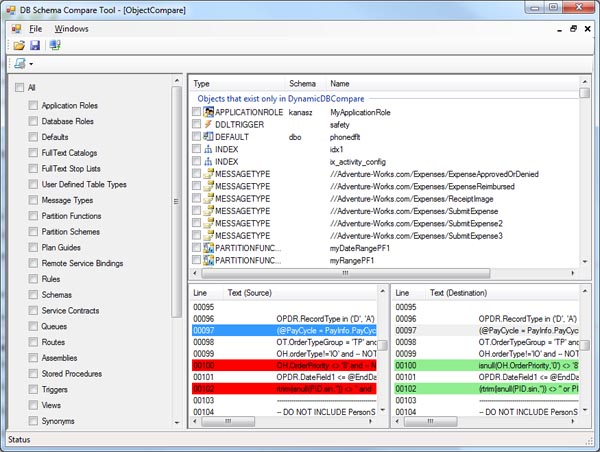
This new article is about comparison of databases and how to perform comparison of two databases using Server Management Objects in C#.
More information you can find here.
Subscribe to:
Posts (Atom)

